

Using Cascadia Code with Zed
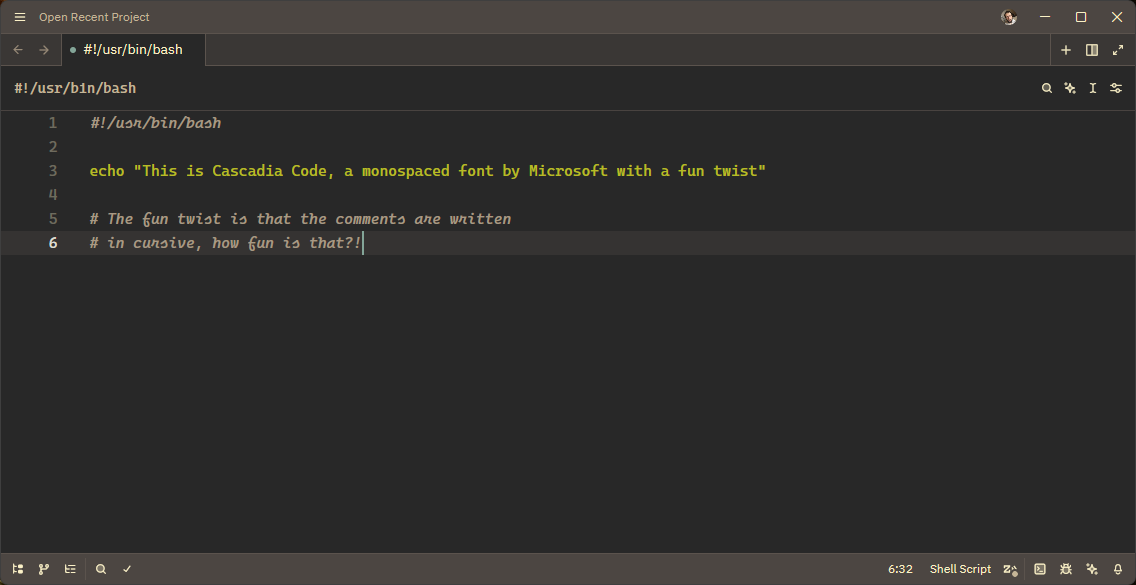
Cascadia Code is a font by Microsoft which has taken a little bit of a fun approach toward the standard mono-spaced fonts. As you can see from the screenshot, it has a slightly more fun standard font, but as well as that you can see the comments can be written in cursive. It has 2 modes for comments; just italic, or cursive.
To get this working in Zed you need to download the font from the release page, then get them all installed. On Windows 11 you can extract the archive, go to the ttf2 folder (they suggest this version for best support on Windows), highlight all the items and then right click. You should see "Install" in your context menu there.
Next up you then head over to Zed and open your settings file, we are using file as there are some options that do not have GUI settings for.
{
  // ..
  // NF means NerdFonts, providing glyfs for common developer-centric things
  "buffer_font_family": "Cascadia Code NF",
  "buffer_font_features": {
    // ss01 enables cursive comments
    "ss01": true,
  },
  "terminal": {
    // I read somewhere that this helped with some of the nerdfont renderings
    "line_height": "standard",
  },
  "experimental.theme_overrides": {
    "syntax": {
      "comment": {
        // cursive / fancy comments are enabled through the use of the italic style
        "font_style": "italic",
      },
    },
  },
  // ..
}
I actually added this to the website using the following code snippet, though you should note that using the Google Font seems to not provide the additional styleset's.
<link rel="preconnect" href="https://fonts.googleapis.com">
<link rel="preconnect" href="https://fonts.gstatic.com" crossorigin>
<link href="https://fonts.googleapis.com/css2?family=Cascadia+Code:ital,wght@0,200..700;1,200..700&display=swap" rel="stylesheet">
<link rel="stylesheet" href="https://cdn.jsdelivr.net/npm/prismjs/themes/prism-solarizedlight.min.css">
<script src="https://cdn.jsdelivr.net/npm/prismjs/prism.min.js" defer></script>
<script src="https://cdn.jsdelivr.net/npm/prismjs/plugins/autoloader/prism-autoloader.min.js" defer></script>

<style>
  :root {
    --font-mono: "Cascadia Code", sans-serif;
  }

  code[class*="language-"], pre[class*="language-"] {
    font-variant-alternates: styleset(ss01);
    font-feature-settings: "calt" 1;
    font-family: var(--font-mono);
    font-style: normal;
    font-weight: 400;
  }

  code .token.comment {
    font-style: italic;
  }
</style>
Member discussion